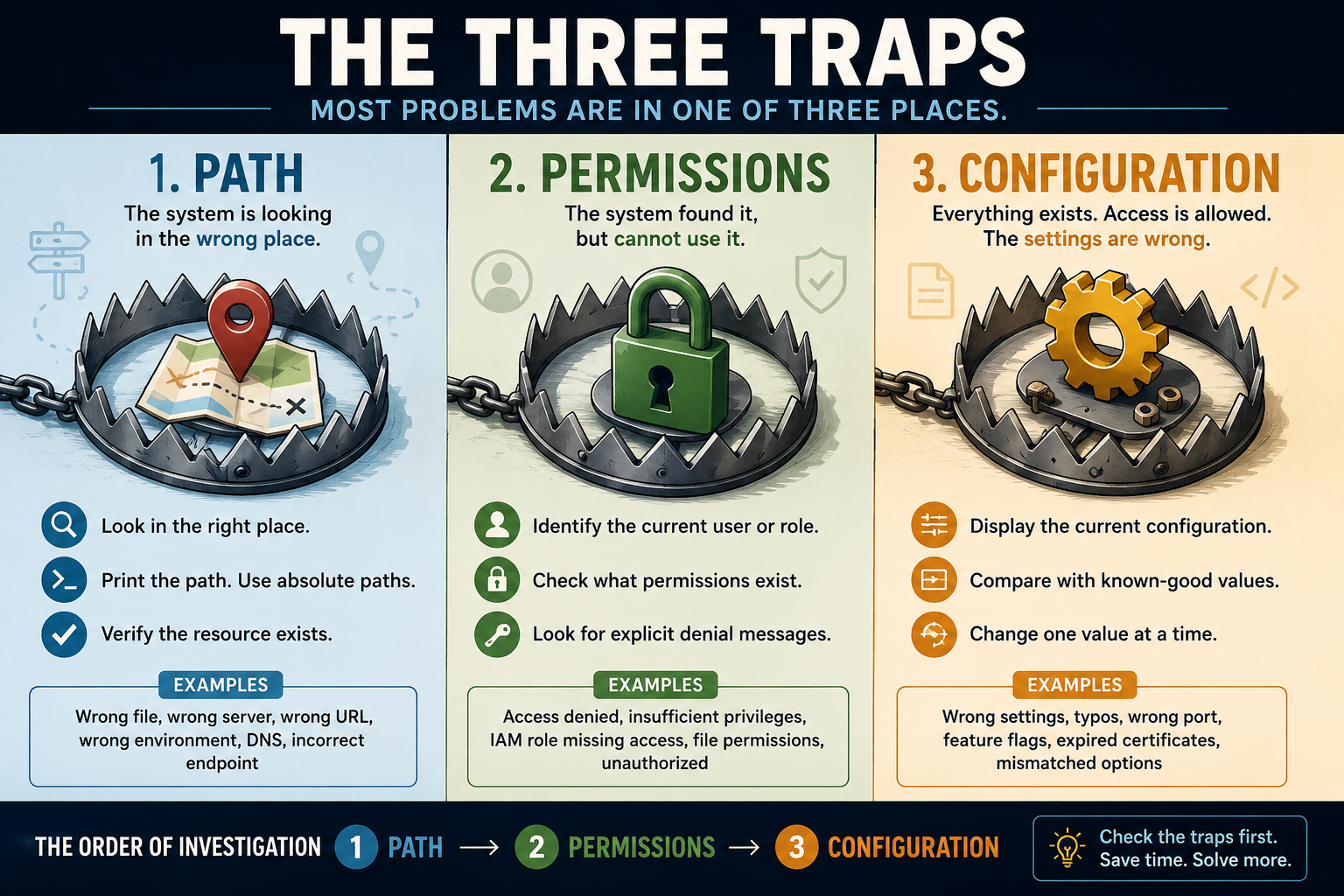
Software engineers love rules. We have design patterns, coding standards, architectural principles, and famous laws that attempt to explain why systems succeed or fail. Especially when AI is involved, most technical problems ultimately fall into one of three categories:
- Path
- Permissions
- Configuration
I call these The Three Traps.
Whenever a system fails, a service refuses to start, a user cannot log in, or an application behaves unexpectedly, one of these traps is usually responsible. They appear in operating systems, cloud platforms, databases, mobile applications, containers, web servers, and development environments.
Understanding how to recognize them can dramatically reduce troubleshooting time.
Trap #1: Path
The system is looking in the wrong place.
A path problem occurs whenever a program, user, or service cannot locate the thing it needs.
Examples include:
- A file doesn’t exist where the application expects it.
- An environment variable points to the wrong directory.
- DNS resolves to the wrong server.
- An API URL references the wrong endpoint.
- A Docker volume mounts the incorrect folder.
- A command isn’t found because it isn’t in the PATH environment variable.
DNS failures are often treated as their own category, but DNS is fundamentally a path problem. The computer is simply being directed to the wrong destination.
Questions to ask
- Is this the correct file?
- Is this the correct server?
- Is this the correct hostname?
- Is this the correct URL?
- Is this the environment I think I’m in?
Debugging techniques
Print the path.
Many problems disappear once you display exactly what the software believes.
Examples:
pwd
which node
echo $PATH
echo $DATABASE_URL
nslookup example.com
Use absolute paths.
Relative paths frequently cause failures.
Instead of:
./config.jsonTry:
/opt/myapp/config.jsonVerify assumptions.
SSH into the server. Open the directory. Inspect the environment variables. Confirm that the resource actually exists.
Trap #2: Permissions
The system found the thing, but cannot use it.
Modern computing is built on layers of security. Users, groups, roles, policies, service accounts, IAM permissions, ACLs, and access tokens all determine what a process may do.
Examples:
- A web server cannot read a certificate.
- An AWS role lacks access to S3.
- A database user lacks table permissions.
- A container cannot access a mounted volume.
- A GitHub token lacks repository permissions.
- A Google Workspace admin lacks a required role.
The resource exists. The system knows where it is. Access is denied.
Questions to ask
- Who is performing this action?
- What identity is being used?
- What permissions does that identity possess?
- Has anything changed recently?
Debugging techniques
Determine the current identity.
whoami
id
aws sts get-caller-identity
Attempt the operation manually.
Can the user read the file?
cat file.txtCan the role access the bucket?
Can the account log in directly?
Look for explicit denial messages.
Systems are often surprisingly honest:
- Access Denied
- Permission denied
- Unauthorized
- Forbidden
- Insufficient privileges
Believe these messages.
Trap #3: Configuration
Everything exists. Access is allowed. The settings are wrong.
Configuration problems occur when software behaves exactly as instructed rather than as intended.
Examples:
- Wrong database password.
- Incorrect port number.
- TLS enabled on one side but not the other.
- Typographical errors in environment variables.
- Feature flags set incorrectly.
- Misconfigured load balancers.
- Incorrect timeout values.
Configuration problems become more common as systems grow.
One application may depend on:
- Environment variables
- JSON files
- YAML files
- Secret stores
- Cloud settings
- Container definitions
- CI pipelines
Any one of them can be wrong.
Questions to ask
- What values are actually being used?
- Are production and development configured differently?
- Did someone change a setting recently?
- Does the software support the option being specified?
Debugging techniques
Display the configuration.
Many applications support:
app --config-dumpor:
envCompare known-good environments.
Diff production against staging.
Diff today’s configuration against last week’s.
Change one variable at a time.
Changing five settings simultaneously makes troubleshooting nearly impossible.
The Order of Investigation
When something breaks, investigate in this order:
1. Path
Are we looking in the right place?
2. Permissions
Can we access it?
3. Configuration
Are the settings correct?
This sequence eliminates large classes of failures quickly.
A database connection issue might become:
- Is this the right database host?
- Can this account connect?
- Is the connection string correct?
A file upload issue becomes:
- Is this the correct storage bucket?
- Does the application have permission?
- Are the storage settings correct?
A deployment failure becomes:
- Did we deploy to the right environment?
- Does the service account have access?
- Is the configuration valid?
Why This Matters
Modern systems are incredibly complex.
Cloud platforms contain thousands of permissions.
Applications depend on hundreds of configuration settings.
Microservices communicate across dozens of networks.
Complexity encourages us to search for complicated explanations.
The Three Traps encourage the opposite.
Before assuming a framework bug, a cloud outage, or a mysterious race condition, ask:
- Are we looking in the right place?
- Are we allowed to access it?
- Are the settings correct?
More often than not, one of those answers will solve the problem.
The Three Traps
When troubleshooting:
- Path — Are we talking to the right thing?
- Permissions — Are we allowed to use it?
- Configuration — Are we using it correctly?
The experienced engineer is not the one who knows every technology.
It is the one who checks the traps first.
You could even turn this into a recurring troubleshooting mantra for your team:
Path. Permissions. Configuration.
Before opening a bug ticket, before escalating to another team, and before blaming the framework, check the three traps.
Leave a Reply