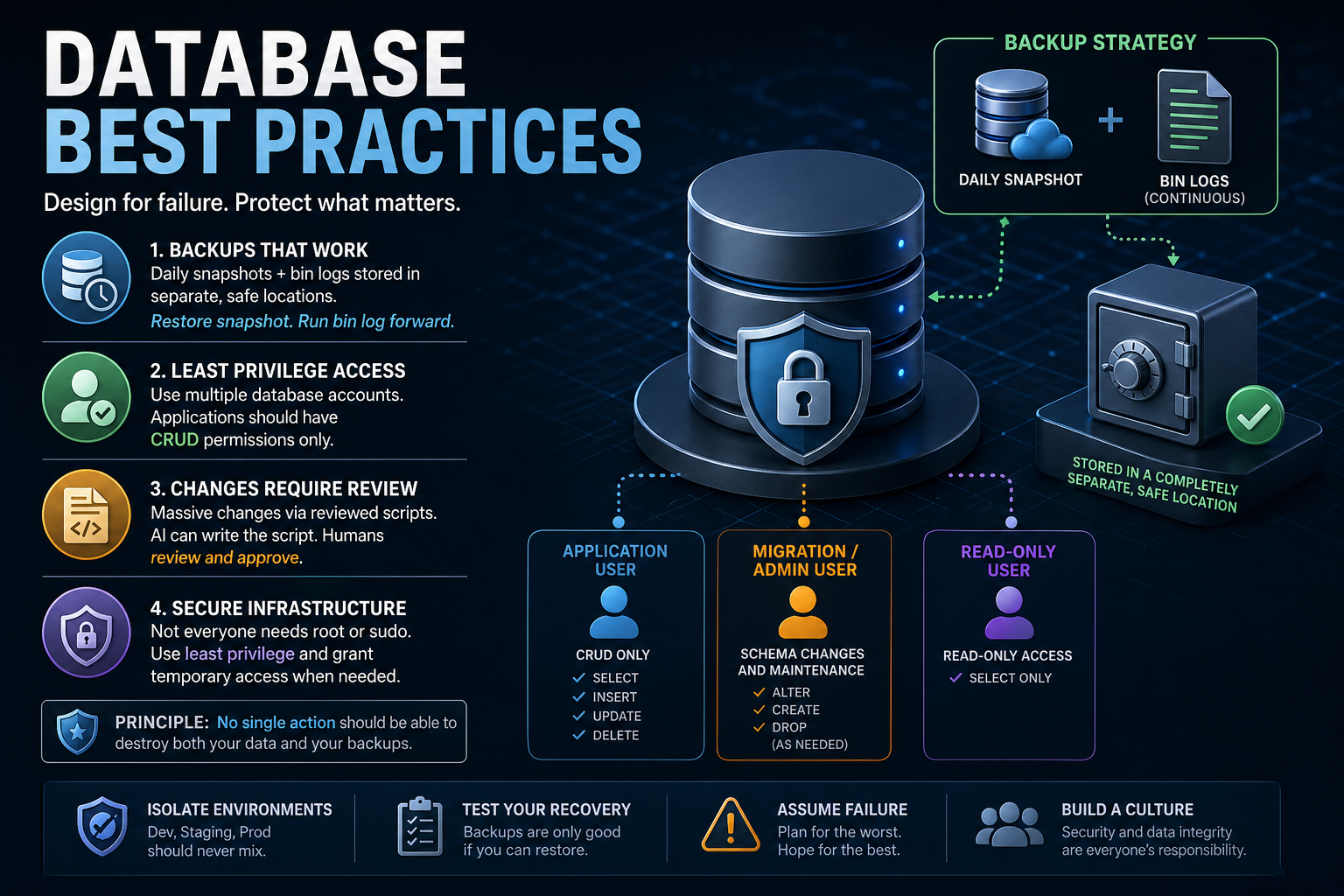
What Prompted This Post
Two days ago, the founder of PocketOS shared a now-viral account of how an AI coding agent deleted his company’s production database—and the backups along with it—in a single automated action. With no viable recovery path, the team was forced to restore from a three-month-old backup that had only existed for a separate data analysis task. The incident has since spread widely across the internet, raising serious questions about AI safety, infrastructure design, and operational discipline.
This is a teachable moment.
Stories like this aren’t edge cases—they’re warnings. Not about AI, but about systems that are fragile by design. If your database strategy depends on everything behaving correctly, you’re already exposed.
Good engineering assumes the opposite: things will go wrong. The goal is to make sure those failures are survivable.
1. Backups That Actually Protect You
Let’s get something straight: if your backups disappear when your database does, they were never backups.
What you should be doing
A resilient database setup includes:
- Daily full snapshots, stored in a completely separate system
- Transaction logs (MySQL bin logs, PostgreSQL WAL, SQL Server transaction logs, Oracle redo logs)” capturing every change after each snapshot
- A tested recovery process:
- Restore the latest snapshot
- Replay bin logs forward to the exact moment before failure
This gives you point-in-time recovery, which is the gold standard.
Say it again POINT IN TIME RECOVERY! Snapshots alone are not enough! You restore your most recent snapshot and then play your transaction logs forward from the snapshot to right before the disaster. COMPLETE RECOVERY.
Why it matters
In the PocketOS incident, backups were stored in the same place as the production data. One destructive action wiped out both. That’s not bad luck—that’s a shared blast radius.
Your system should be designed so that:
No single action can destroy both your primary data and your backups.
If that’s not true today, you have work to do.
2. Use Multiple Database Accounts with Strict Permissions
Too many applications run with database credentials that have far more power than necessary.
A better model
You should have clearly separated roles:
- Application user
- Limited to CRUD operations only
- Cannot alter schema or drop tables
- Migration/admin user
- Used only for schema changes or bulk operations
- Not embedded in application code
- Read-only users
- For analytics, reporting, and dashboards
Why this matters
If your application—or an automated tool acting on its behalf—has full database permissions, you’ve created a single point of catastrophic failure.
Limit the blast radius:
Your application should not have the power to destroy your database.
3. Treat Database Changes Like Code
Massive database changes are not routine operations—they are high-risk events.
The right approach
- All major changes should be:
- Written as scripts
- Reviewed before execution
- You can use AI to generate scripts
- But you must review them
- You must understand them
- You must explicitly approve execution
Why this matters
In the incident above, an automated agent made a destructive decision on its own and executed it immediately. There was no review step, no checkpoint, no human in the loop.
That’s not automation—that’s abdication.
Your rule should be:
No destructive or large-scale change runs without human review.
4. Apply the Same Discipline to Infrastructure
Your database is only as safe as the infrastructure around it.
Common mistake
- Overuse of
root,sudo, or globally scoped API tokens - Credentials that can do everything, everywhere
Better approach
- Use least privilege access across all systems
- Implement:
- Role-based access control (RBAC)
- Scoped API tokens (by environment, resource, and action)
- Grant elevated access temporarily, not permanently
The mindset
It’s better to occasionally slow down and grant access than to recover from a system-wide failure caused by excessive permissions.
Convenience is not worth catastrophic risk.
5. Don’t Rely on “Rules” as Safety Mechanisms
One of the most revealing parts of the story is that the AI agent knew it shouldn’t perform destructive actions—and did it anyway.
That highlights a critical truth:
Instructions are not safeguards. Systems are.
Policies, prompts, and guidelines are useful—but they are not enforcement.
Real safety comes from:
- Permission boundaries
- Confirmation steps for destructive actions
- Isolation between environments
- Backup systems outside the primary blast radius
If your system relies on something “knowing better,” it will eventually fail.
6. Build Systems That Survive Mistakes
Mistakes are inevitable:
- Humans make them
- Scripts make them
- AI makes them
Your job is not to eliminate mistakes—it’s to design systems that absorb them.
A resilient database strategy includes:
- Offsite, isolated backups
- Snapshot + bin log recovery
- Strict access control everywhere
- Reviewed, intentional database changes
- Environment isolation (dev, staging, production)
- No shared failure domains
Final Thought
The PocketOS incident wasn’t just about AI—it was about a system where too many things were allowed to fail at once:
- Backups weren’t isolated
- Permissions were too broad
- Automation had too much authority
- Safeguards weren’t enforced
That combination is what turns a simple mistake into a full-blown disaster.
If you’re running a production database, take this seriously:
Design your systems so that when something goes wrong—and it will—you can recover quickly, completely, and without panic.
Leave a Reply