I used to use a filter in gmail to forward important emails to my verizon sms email address <number>@vtext.com, but most carriers are removing sms via email. So now, to receive an escalated notifications for specific emails in the Gmail Android app, you can use filters to assign a label to those messages and then enable special notifications for that label.
Follow these steps on your Android device:
Create a filter:
On your computer, open Gmail and go to Settings > Filters and Blocked Addresses.
Create a new filter by entering the email address or other criteria for the specific thread/sender in the “From” field.
Select Create filter and choose Apply the label, then create a new label (e.g., “Priority”).
Enable notifications for the label:
Open the Gmail app on your Android device and tap the menu icon (three bars).
Scroll down, tap Settings, and select the specific Gmail account.
Tap Manage labels.
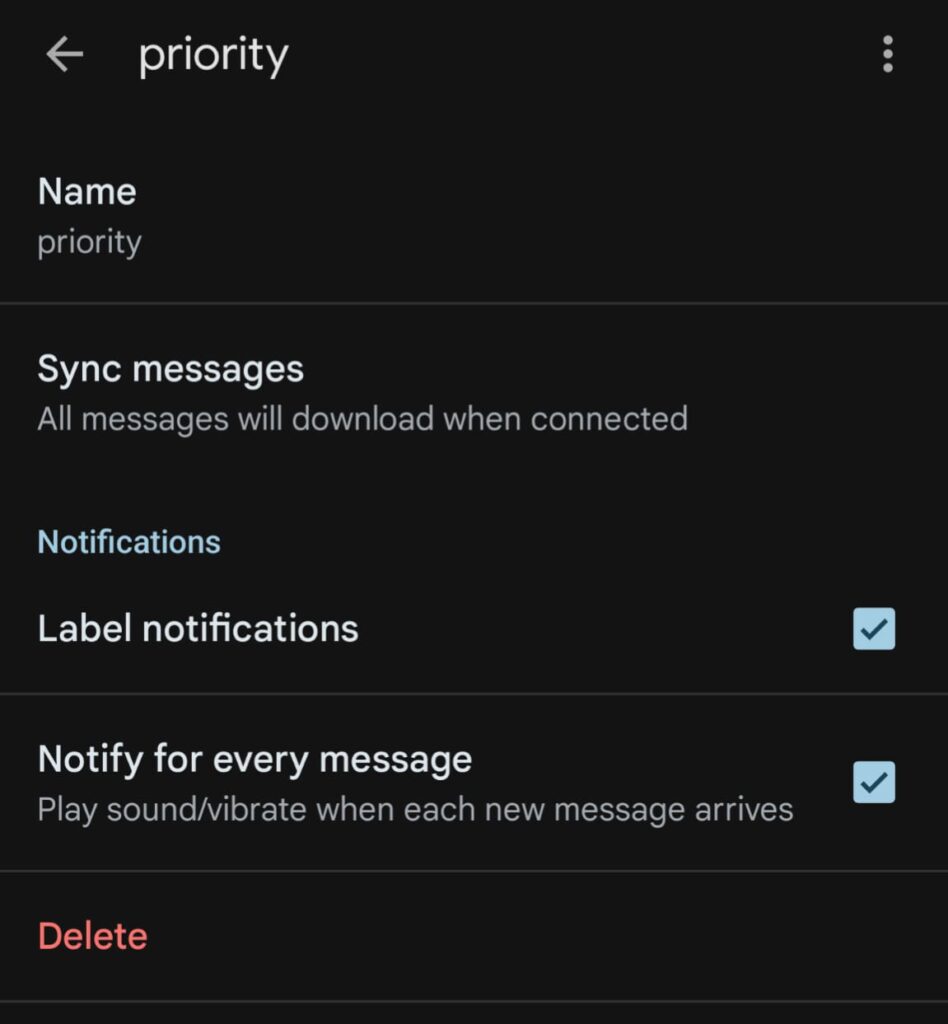
Select the label you created.
Tap Sync messages and ensure a sync period is selected (if you do not synchronize messages, you cannot turn on notifications for that label).
Check the box for Label notifications.
Please note that this notification method is specific to the Gmail Android app and is not available in the Gmail iOS app.
Leave a Reply