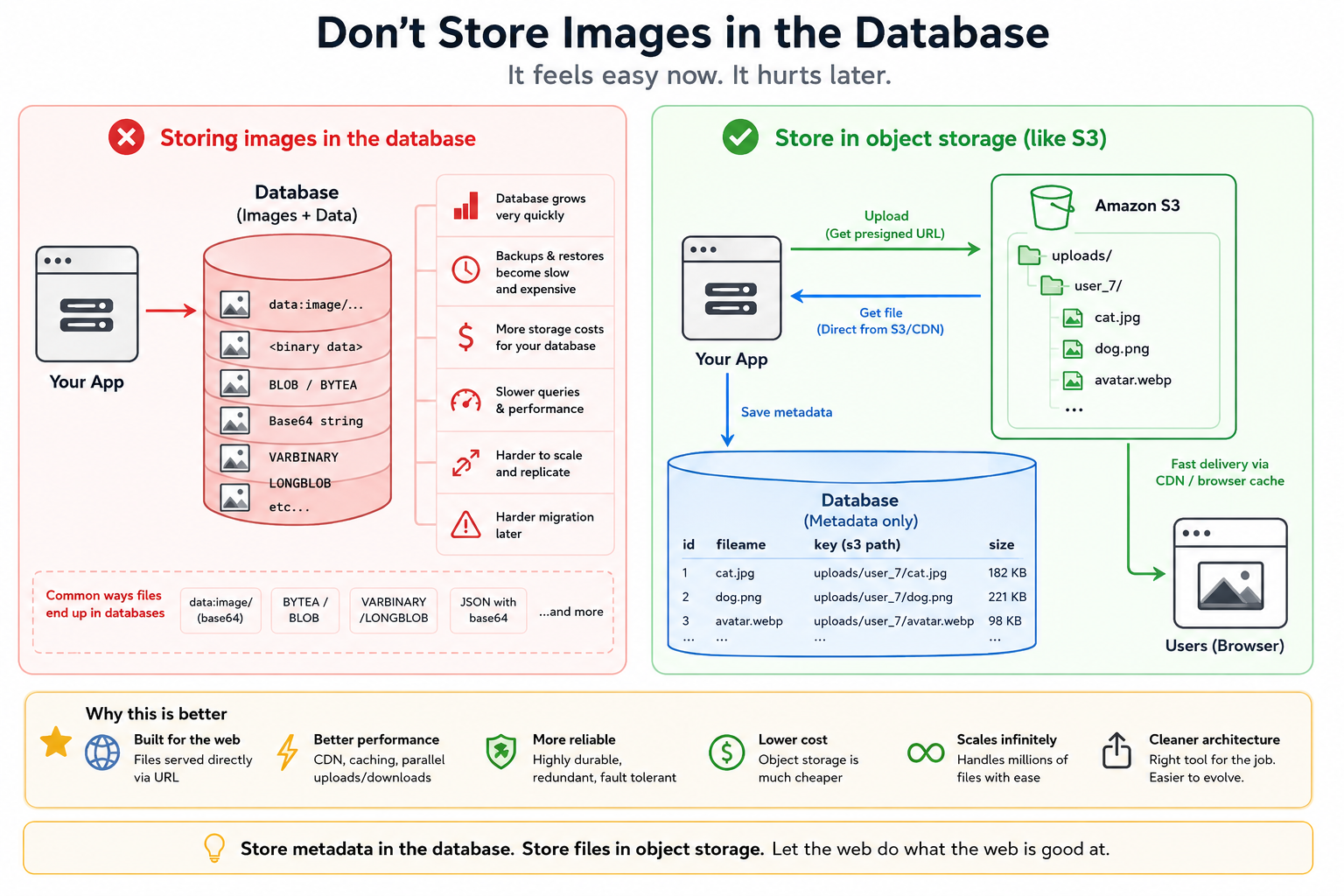
One of the easiest mistakes for newer developers — especially in the age of vibe coding and AI-assisted app building — is storing uploaded images directly in the database.
And honestly, it’s not just beginners.
Even experienced engineers say things like:
“We’re not going to have that many images.”
“It’ll be simpler if everything is in one place.”
“We can always migrate it later.”
Sometimes they’re right.
Usually they’re creating a future problem.
Why It Feels So Easy
The trap exists because storing files in a database feels incredibly convenient at first.
You already have a database.
You already know how to save records.
And modern frameworks make file uploads almost absurdly easy.
Within minutes you can do things like:
CREATE TABLE images (
  id SERIAL PRIMARY KEY,
  image_data BYTEA
);
Or:
const base64 = file.toString("base64")
await db.insert({
  image: `data:image/png;base64,${base64}`
})
Or:
LONGBLOB
BLOB
BYTEA
VARBINARY(MAX)
Depending on the database.
You upload a file.
You save it.
Done.
No storage buckets.
No CDN.
No extra infrastructure.
No thinking about file paths.
The app works.
For a while.
The Different Ways Developers Store Files in Databases
There are several common approaches.
Base64 Data URLs
This is common in AI-generated code and quick prototypes:
data:image/png;base64,iVBORw0KGgoAAAANS...
This feels convenient because the browser can render it directly.
But Base64 inflates file size by roughly 33%.
A 3 MB image becomes ~4 MB before it even touches your database.
And now every query, backup, replication stream, and ORM object is dragging around giant strings.
Binary Columns / BLOBs
This is the “more professional” version:
- PostgreSQL
BYTEA - MySQL
BLOB - SQL Server
VARBINARY(MAX)
At least you’re storing raw bytes instead of inflated text.
But the architectural problem is still there:
Your primary relational database is now acting as a file server.
Embedded Files in JSON
This one is especially common in vibe-coded applications.
Developers store images directly inside JSON payloads:
{
  "title": "Profile",
  "avatar": "data:image/jpeg;base64,..."
}
Now the database, API responses, caching layer, and frontend state management are all contaminated with giant binary payloads masquerading as text.
Everything becomes heavier.
Why This Becomes Painful
The issue is not that databases can’t store files.
They absolutely can.
The issue is that databases are expensive, performance-sensitive systems optimized for structured data and indexed queries.
Images are not that.
Your Database Grows Shockingly Fast
A few thousand images sounds small until backups start taking forever.
Then:
- replication slows down
- restores become miserable
- migrations get risky
- snapshots become expensive
- local development databases become enormous
Suddenly your 2 GB production database is 180 GB.
And most of that is JPEGs.
Every Query Gets Heavier
Even if you’re “not selecting the image column,” large rows still create overhead.
Indexes bloat.
Caching becomes inefficient.
ORMs accidentally hydrate huge payloads.
API latency increases.
You start adding weird optimizations to compensate for a problem you created yourself.
Backups Become a Nightmare
This is one of the biggest hidden costs.
Databases are precious infrastructure.
You back them up constantly.
You replicate them.
You snapshot them.
When images live inside the DB:
Every backup contains every image.
Forever.
That means:
- larger backup costs
- slower disaster recovery
- slower cloning of environments
- painful CI/testing workflows
Your infrastructure cost quietly starts drifting upward.
Scaling Gets Weird
Databases scale differently than file storage systems.
You usually want your database optimized for:
- transactions
- queries
- consistency
- indexing
You want file storage optimized for:
- throughput
- caching
- geographic delivery
- cheap storage
- parallel access
Combining the two creates tension.
Browsers Are Already Good at Serving Files
This is the ironic part.
Web browsers are unbelievably good at loading files from URLs, and web SERVERS were made to serve files! Your basic webserver is built on top of 30 years of improvements in serving files FAST!
That’s literally what the web was built for.
A browser sees:
<img src="https://cdn.example.com/cat.jpg">
And immediately handles:
- caching
- progressive loading
- concurrency
- conditional requests
- byte ranges
- CDN acceleration
- lazy loading
You get decades of optimization for free.
When you shove image data through your API instead, you bypass all of that.
Now your app server becomes responsible for work the web platform already solved years ago.
The Better Pattern
Store:
- metadata in the database
- files in object storage
Your database row should look more like this:
{
  "id": 42,
  "user_id": 7,
  "filename": "cat.jpg",
  "mime_type": "image/jpeg",
  "size": 182736,
  "storage_key": "uploads/7/abc123.jpg"
}
And the actual file lives in:
- Amazon S3
- Cloudflare R2
- Google Cloud Storage
- Azure Blob Storage
- Backblaze B2
- MinIO
- even plain filesystem storage
Now your database stays lean and fast.
Why S3-Style Storage Wins
Object storage systems are specifically engineered for this problem.
They provide:
- essentially infinite scaling
- absurd durability
- cheap storage
- CDN integration
- signed URLs
- lifecycle policies
- automatic redundancy
- parallel delivery
- multipart uploads
And they work beautifully with browsers.
A user uploads directly to storage.
The browser requests files directly from storage.
Your application barely touches the file bytes at all.
That is a huge architectural advantage.
Especially at scale.
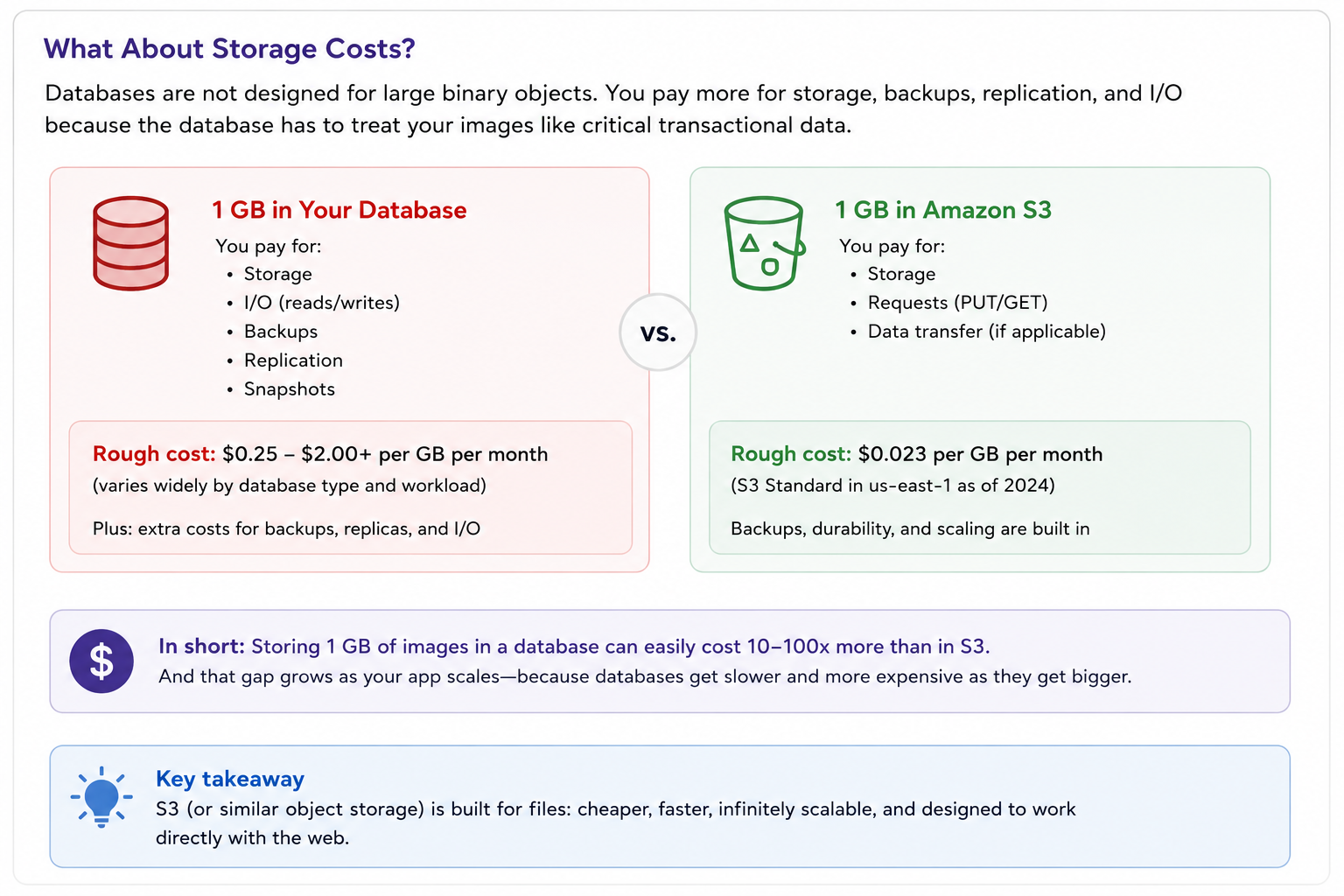
“But We Don’t Have That Many Images”
This is the sentence that starts the problem.
Because almost nobody predicts growth correctly.
And even if you truly only have a few thousand images, separating storage concerns is still usually cleaner architecture.
The real danger is not that storing files in the database instantly destroys your app.
The danger is that it works just well enough to survive into production.
And by the time it hurts, migrating away becomes painful.
The Rule I Recommend
For most web apps:
- Store metadata in the database
- Store files in object storage
- Serve files via URLs
- Let browsers and CDNs do their job
There are exceptions.
Small internal tools?
Fine.
Tiny avatars?
Probably okay.
Transactional document systems with strict consistency requirements?
Maybe.
But for normal web applications with user uploads, images, PDFs, videos, exports, or generated assets:
Treat your database like a database.
And treat your files like files.
Leave a Reply